Beats and bars
Every beat and downbeat, with bar numbers. The bars it is least sure of are marked in amber, so you know where to listen first.
For lighting and video programmers
BeatAtlas finds every beat, bar and time signature in a track, and the kick, snare, hi-hat and bass hits between them. Place markers that snap to them, then export timing your console and DAW can use.
Windows 10 or 11, 64-bit. Works offline. Your audio never leaves your PC.
01 What it does
Open a song and BeatAtlas lays out its structure on a grid you can trust, and shows you where to check it.
Every beat and downbeat, with bar numbers. The bars it is least sure of are marked in amber, so you know where to listen first.
4/4, 7/8, 5/4 and the switch between them in the middle of a song. The grid follows the music, not a guess.
Intro, verse, drop, outro: add them, name them and colour them. Your markers are grouped by section.
The hits between the beats: fills, stabs, rolls. Each in its own lane, with a salience control to show only what stands out.
Drop markers while the song plays, snap them to beats or hits, drag and nudge them precisely. Or place them automatically on hits, bars or sections.
Select a fill once. BeatAtlas finds every other place with the same pattern and adds your markers to each one you tick.
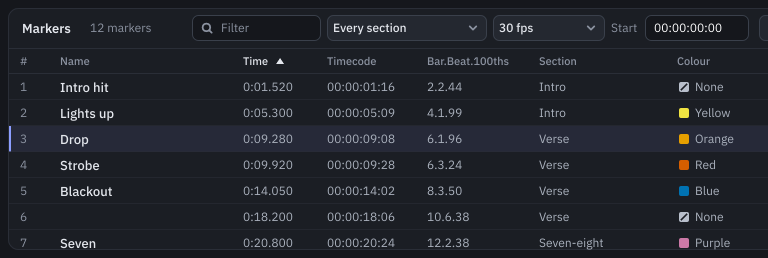
01.2 The marker list
All your markers in one table: name, time, timecode, bar and beat, section, colour and note. Filter it, sort it, edit it in place, or pop it out into its own window.
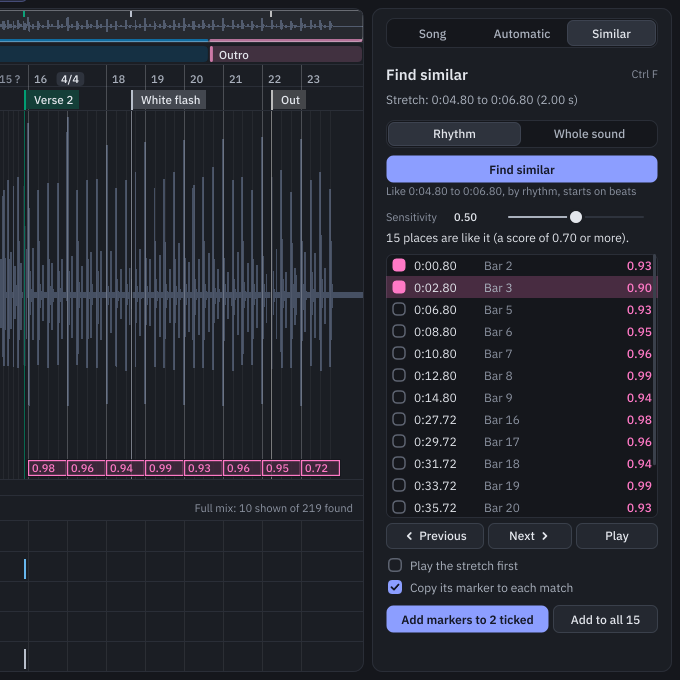
01.3 Find similar
Mark a stretch, match it by rhythm or by the whole sound, and step through the results with a score for each. Tick the ones you want and add the same markers to all of them.
02 Who it is for
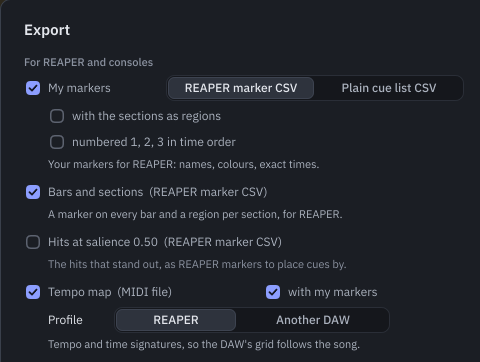
Build a timecoded cue stack from real bar lines and hits. Export your markers as a CSV in the REAPER marker layout, which several lighting packages can import.
Know where every section lands before you cut content. Run the LTC timecode WAV into anything that chases timecode.
Bring the tempo map, the time signatures and your markers into REAPER with the MIDI file, so the grid follows the song.
03 Exports
Timing data in the formats your tools already read. One dialog, one folder, done.
04 Offline
The analysis runs on your own computer. No cloud, no upload of unreleased music. Once activated, BeatAtlas works in a venue with no signal; it only needs to check in with our server at least every 30 days, and a show PC that never goes online can do that with a file.
05 Pricing
£50
£50, no VAT charged. One payment, no subscription.
Secure card payment by Stripe. Changed your mind? Our 14-day refund promise.
06 FAQ
More in Help.
A PC with Windows 10 or Windows 11, 64-bit. A Mac version is planned for later.
Download BeatAtlas and use every feature free for 7 days. It needs the internet once to start (or a file, for a PC that never goes online). When you are ready, buy a key and enter it in the app: your maps carry on.
Once, to activate. After that BeatAtlas works offline. It checks in with our server at least every 30 days when it can, so it keeps working through a tour. A show PC that never goes online can activate and check in with a file.
2 at once. If you replace a computer, free the old one in the app or on your account page.
Yes. If BeatAtlas is not right for you, e-mail us within 14 days of buying and we will refund you in full. The details are in our refund policy.
WAV, AIFF, FLAC and MP3. WAV is the safest choice for shows.